What's new in AccountScout 2018.1
Three changes shipped in this release: merging duplicate advertisers, a digital asset manager hook on retail orders, and screen layouts that only save when you say so.
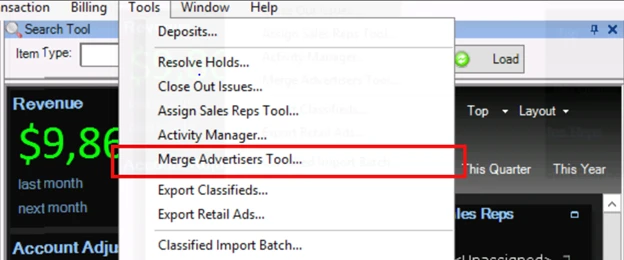
Three significant changes shipped in AccountScout 2018.1. As always, customers on an active service contract or a SaaS plan received the upgrade at no additional charge.
The headline changes
Merge Advertiser tool. Consolidates two advertiser records into one, so duplicate accounts stop being a permanent tax on your data. Everything attached to the record moves across — contacts, activities, orders, payments — onto whichever advertiser you mark "To Keep."
Digital asset manager integration. A hook was added to the Retail Order screen. Whenever a retail order is saved, the DAM is notified to create, update, or mark the associated order for deletion. The point is real-time communication with the composing team: design work reflects orders as they are entered or changed, rather than after somebody sends an email about it.
Save Layout on every ribbon bar. By request, screen layouts no longer save automatically when you close a screen. A Save Layout button was added to every ribbon bar, so a layout changes only when you deliberately change it. If you rearrange the Retail Order, Advertiser, Classified/Legal Order, or Payments screen and want to keep it, click Save Layout before closing the window.
Upgrade notes
This release upgrades the database. The .NET framework used by AccountScout, the AccountScout Mobile app service, and the Classified Order Entry service moved to version 4.6.1.
Accounting changes
Worth forwarding to whoever handles your books.
- Merge Advertiser tool — as above. Account balances and everything related consolidate onto one record, which matters most when you spot the duplicate mid-invoice run or while chasing a statement.
- Invoice screen — payments and advertiser credits applied to an invoice now display on the invoice and open with a double click, rather than requiring a separate trip to the Payments screen.
- Invoice and Refund screens — an Unapply Credits button was added to the ribbon bar. It detaches applied credits from the loaded invoice or refund, so the invoice is no longer marked paid; the credit itself stays on the account.
- Invoice batch — running Undo Generate now automatically unapplies any credits on an invoice being deleted. Previously those applied credits blocked the deletion.
- Interest batch — the same change, for un-generated interest batches.
- Credit card payments — an authorised credit card charge can no longer simply be deleted. Attempting it now explains the correct path: void the charge if it has not settled, or refund the card if it has and create an offsetting refund. If the charge can be voided, the payment can then be deleted.
Composing, design, and production changes
- Digital asset manager — as above, on the Retail Order screen. If you have not set up an asset manager integration, it is worth a call; it is straightforward and it removes a lot of back-and-forth between departments.
- Define Sales Types — a new checkbox, "Do not export retail runs having this Sales Type to the Digital Asset Manager." Useful for circulars, house ads, space, and subscriptions — things commonly entered as retail orders that the design team does not need.
- Digital Asset Manager Export tool — gained a Sales Type column, and now skips retail orders whose sales type is marked to exclude.
Retail order changes
The Ad Copy pane gained an option for PDF documents to zoom to fit the width of the ad into the available window.
Permissions
- A permission was added for the Merge Advertisers tool. Roles that already had permission for the Assign Sales Reps tool were granted it automatically during the database upgrade.
- The same applies to the Activity Manager tool, introduced shortly before this release.
Everything else
The mobile app and Classified Order Entry web services now require .NET 4.6.1. A handful of smaller changes are listed in the full What's New document, available from the AccountScout Help menu.
It is worth staying current. Most of what ships comes from customer requests, and each release is meant to make a specific job faster.